Welcome to Scotflix
Scotflix runs on Hiway, where you store, share, sell and distribute your film, with real-time payments and your audience data in your own account. This guide takes you from a blank account to live and earning.
Ten steps. One afternoon.
In this guide you will:
- Create your Hiway account and connect Stripe so you can get paid.
- Upload your film and fill in the details, assets and subtitles.
- Publish paywalled SmartLinks and share private screeners.
- Apply to Scotflix through Distribution and approve the syndication contract.
- Track every view and rental in real-time analytics, and invite your team.
One thing to know before you start
Your film never leaves your Hiway library. Every channel streams it from there. If you ever want to pull it, you can, with one click, subject to the terms of your contract.
Set up your account
Go to portal.onthehiway.com and click Create Account. Choose Publisher or Content Owner.
Sign up
- Sign in with your email or your Google account.
- If you use email, we send a one-time password. Enter it within 10 minutes.
- Add your name or company name, a logo and a short description. This is what viewers see on your film pages, so use the name you want the public to see, not a holding company.
- One login covers the Hiway portal and every Hiway-powered platform.
Pick a plan
Start free with one title up to 5GB. When you need more, pick a plan: you are running your own film business on Hiway, and there is no listing fee on any channel. Annual billing works out at roughly two months free.
Solo
One content owner
£12/mo
Studio
Small teams
£60/mo
Premiere
Multiple films
£185/mo
Enterprise
Partner platforms
Talk to us
Most filmmakers start free, then move to Solo. There is no extra charge to appear on any Hiway-powered channel.
Connect Stripe
Stripe is how you get paid. Every viewer payment and rental flows directly into your connected Stripe account. You only do this once.
How to connect Stripe
- Go to Settings > Monetisation and click Connect Stripe.
- Enter your business or personal details on Stripe's onboarding page. Use the same name your Hiway account bills under.
- Add your bank account so Stripe can pay you out.
- Verify your identity with the documents Stripe asks for, such as a passport or driving licence.
- When Stripe confirms, you are returned to Hiway with a green Connected status.
Set your payout frequency inside Stripe. Daily, weekly or monthly, whichever suits you.
Upload your film
Two ways to upload. Use the browser for smaller files. Use Hiway Sync for anything large or for bulk uploads.
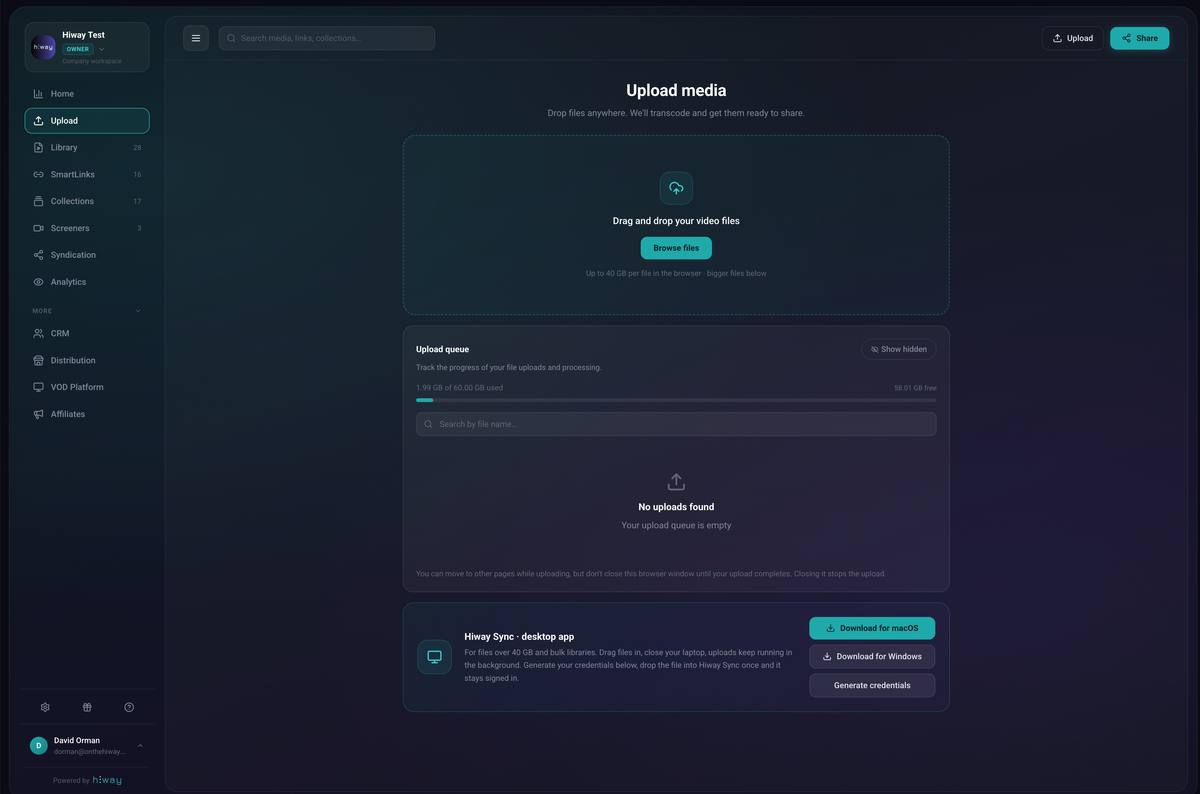
Option A: Browser, up to 40GB
- Go to the Upload page from the left sidebar.
- Drag and drop your video file into the upload area.
- Fill in title, description, genre, release date, production company and tags.
- Click Accept and Complete to start.
Wait for the status to show "Ready" before using the file in a SmartLink.
Option B: Hiway Sync, files over 40GB
- Click the Hiway Sync button on the Upload page and install the desktop app.
- Generate your credentials file in Hiway and download it.
- Drag the credentials file into Hiway Sync.
- Drag your video files in and press Upload.
Use Hiway Sync for 4K, long-form and bulk uploads. It runs in the background.
Accepted formats
Upload a high-quality mezzanine file. Do not pre-compress for web. Hiway handles optimisation automatically.
Details, assets & subtitles
Once your file has uploaded, open your Content Library and click Edit. The more you fill in, the better your film pages look and the more searchable your film is.
Film details
Title, description, content type, genre, original language, country, release date, production company and tags. Toggle on episodic content if this is part of a series.
Cast & crew
Add cast in billing order with photos and character names. Add crew with roles. Press Enter after each name. Cast and crew can also be given their own tracked promo links later.
Assets, images
Drag posters, promotional artwork, stills and behind-the-scenes shots into the Assets tab. Label each one. You choose which appear on each SmartLink and on your film page on each channel.
Subtitles & CC
Upload SRT or VTT files in the Assets tab. Set the language and label. Toggle "Set as Default" for one track if you want it on by default. English captions and subtitles help your film reach the widest audience.
A note on international films
The original language list is being extended. If your language is not yet an option, pick the closest match, note the correct language in your description, and flag it when you apply so it can be corrected.
Create SmartLinks
A SmartLink is how you share, sell or submit your film. One master file can power many SmartLinks, each with different access, prices, regions or expiry dates.
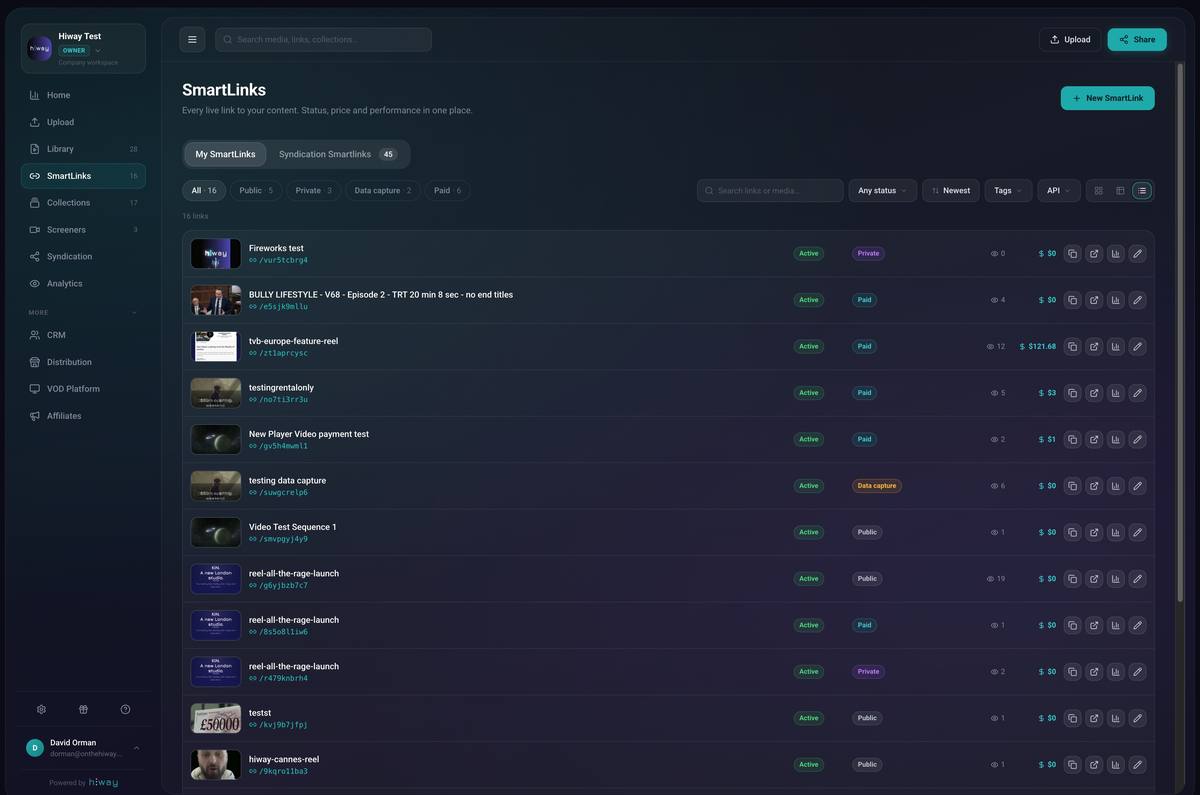
Share privately
Invite-only by email. Use this for financiers, sales agents, festivals and collaborators. Set view limits and an expiry date.
Share publicly
Public link, no login. Ideal for trailers and free promotional content.
Data capture
Viewers enter name, email and phone before watching. Grow your CRM while sharing free content.
Paywalled
Viewers rent or buy. Set your own prices. Requires Stripe connected.
Wizard steps
- Choose access level: private, public, data capture or paywalled.
- Name your SmartLink and select the media file from your library.
- Tick which assets to show on the landing page.
- Set permissions. For private links, add the email addresses and press Enter after each one.
- Optionally set maximum views and an expiry date.
- Set price and regions, for paywalled links.
- Click Publish.
Link your trailer and full film SmartLinks together so viewers move from the trailer straight into the purchase page.
Smart Rooms
Bundle several titles into one curated space. Useful for a series, a festival room or a B2B presentation. The same access levels apply.
Pricing, rentals & regions
You set the price
You set the price, and you can run a weekend sale or a launch offer whenever you like. A channel may suggest pricing, particularly during a theatrical window, but the decision is yours.
How rentals work
A rental gives time-limited streaming access. The film never leaves your library.
- Rental period: 1 to 90 days to start watching.
- Viewing window: 1 hour to 1 week once they press play.
- Maximum views: 1 to 50, or unlimited.
Set defaults in Settings > Monetisation.
Regional pricing & territories
Price differently by continent or country, and block any territory where you have already sold the rights.
If your film is sold in some markets and open in others, this is how you monetise the rest of the world without breaching an existing deal.
Configure in the SmartLink editor, and again in the syndication contract with each channel.
Discount codes
Create codes for press, screenings or partner campaigns. Limit by use count, date and SmartLink. Discounts come off the top, before any other deduction.
Viewers do not need an account
Checkout is a single Stripe payment sheet with Apple Pay and Google Pay. Entering an email creates the viewer record in the background, so you still capture the data.
Piracy protection
Every stream is DRM protected using Widevine, FairPlay and PlayReady. Screen recording and screen sharing are blocked on every browser and device. Viewers can still cast to a television.
Get your film on Scotflix
Hiway-powered channels are curated streaming platforms, from film festivals to genre and community channels. Each one picks its own titles. Your content stays in your library the whole time. The channel just streams it from there.
What you get on a Hiway-powered channel
- A curated home alongside work chosen for that audience.
- Your share of every rental paid direct into your bank, as it happens.
- Full visibility of who is watching, from where and for how long.
- The ability to pull your film with one click if you change your mind, subject to your contract terms.
The process in two steps
- Prepare the film once: uploaded, status Ready, with metadata, artwork, pricing and subtitles all set on the film itself, steps 3, 4 and 6.
- Apply to the channel and select the territories you want to release in. No SmartLink to build first, the system handles it.
- The channel reviews the film through a secure temporary link the system generates for them.
- On approval, a syndication contract is created automatically on the channel's standard terms and your film appears on the channel with pricing, territories and metadata already carried across from your library.
Apply through Distribution
- Open portal.onthehiway.com/dashboard/distribution.
- Open Discover channels, pick Scotflix and press Apply.
- Pick the film from your library. The application is built around the media itself, not a SmartLink you have to create first.
- Choose the territories you want the channel to release in. You can pick worldwide, or specific regions or countries.
- Add a short note about the film, its festival and screening history, and any territories where transactional rights are not free.
- Submit. The channel receives your application and a secure temporary link the system generates in the background so they can watch and assess.
Be straight about existing deals. If a sales agent holds SVOD or AVOD in some territories but transactional rights are free, say so. It usually makes the film easier to accept, not harder.
What happens when a channel approves
If the channel accepts, the system does most of the work for you:
- A syndication contract is created automatically using the channel's standard settings, the payout frequency and data-sharing permissions the channel has pre-configured.
- The territories on the contract come from the ones you selected in your application.
- A SmartLink is created inside the channel's account with your film, its pricing, its territories and all its metadata already set from your library.
- It is one SmartLink, not a duplicate. The same link sits in your account and the channel's account, exactly as syndication works everywhere else on Hiway.
- You keep full visibility of views, sales and audience data from your own dashboard, exactly as with any syndication deal.
Check the contract before it goes live:
- Go to Syndication › Deals to Me.
- Open the channel's contract.
- Check the film, the territories, the split and the payout frequency.
- Click Approve and the film goes live on the channel.
If anything on the contract does not look right, contact the channel before approving. Once you approve, the contract is live and revenue starts flowing on those terms.
Revenue sharing & your own contracts
You can also create syndication contracts yourself, for a co-producer, distributor, marketing partner or sub-licensee. Payments settle directly through Stripe, with no manual transfers. For Hiway-powered channels, use Distribution in step 7. That contract is populated for you.
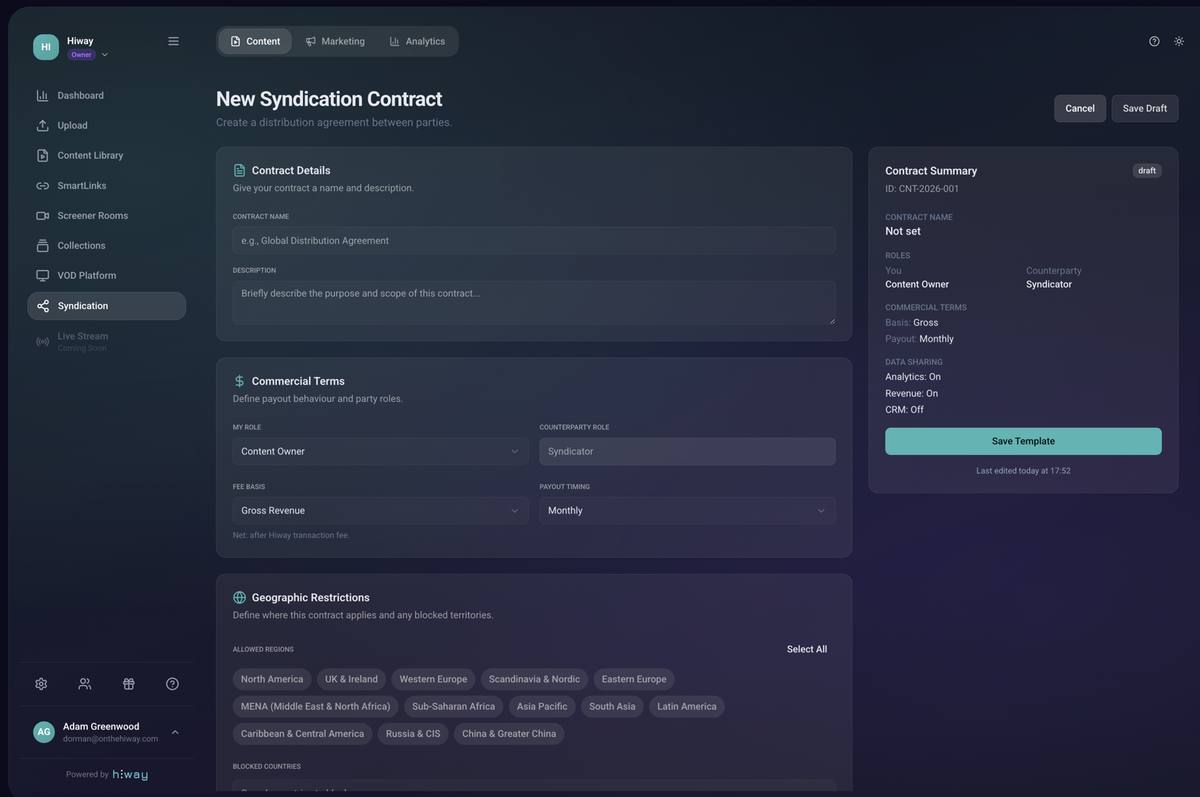
Set up a syndication contract
- Go to Syndication in the left sidebar.
- Click Create Template, name it and add a short description.
- Set commercial terms: your role, revenue split, gross or net basis, payment frequency.
- Choose data-sharing permissions: analytics, revenue, CRM.
- Link specific films or SmartLinks to the contract.
- Send it to your partner. They connect Stripe to receive their share.
How the money flows
A viewer pays, then deductions come off in this order:
- Gross price.
- Any discount code, off the top.
- Payment processing and tax.
- The Hiway transaction fee.
- The split, paid into each party's own Stripe account at the same moment.
Refunds and chargebacks are reconciled separately and will show against your balance.
Analytics & CRM
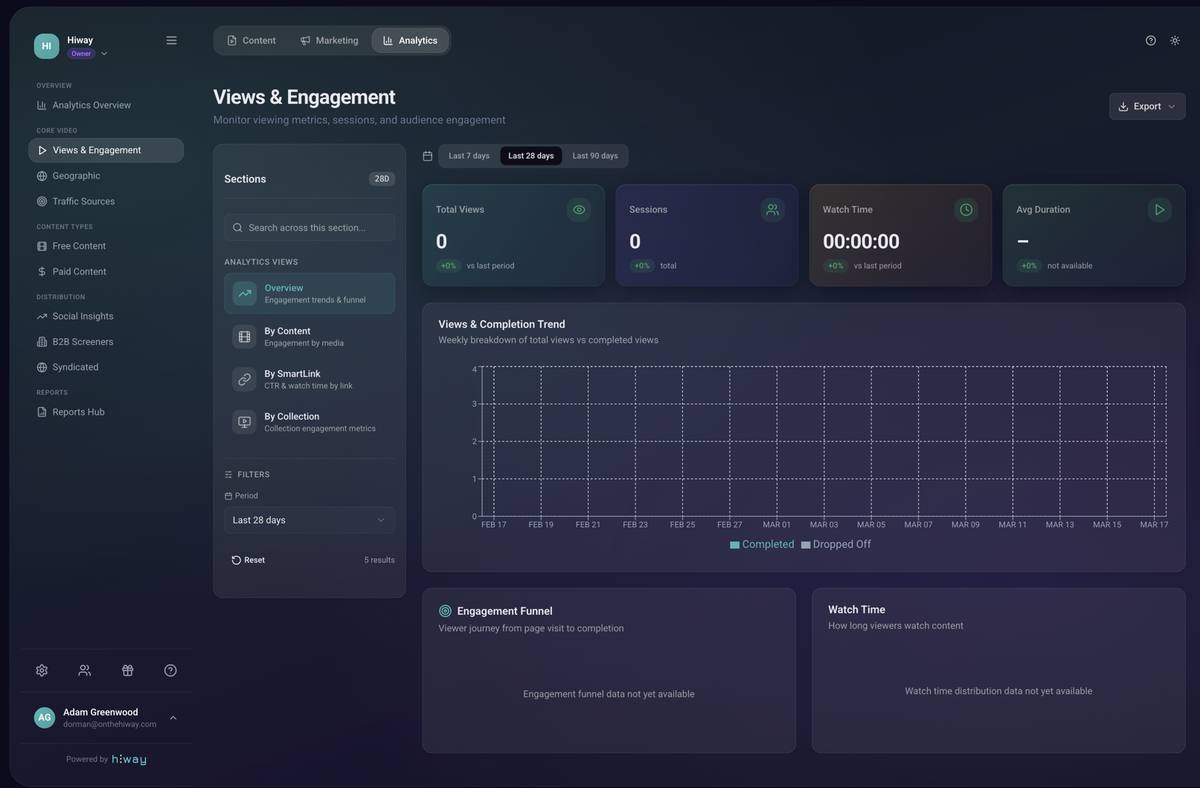
Analytics
Real-time view of every rental, revenue, watch time, top territories, device breakdown and best-performing SmartLinks. Filter by date range, film, country and device.
CRM
Every viewer segmented into private, public and paid audiences. Export as CSV. Your audience data belongs to you, and it is the reason your next film starts ahead.
Invite your team
Bring in producers, marketers, contractors and partners with the exact access they need.
How to send an invite
- Click the gear icon at the bottom left to open Settings.
- Open the Members tab and click Add Member.
- Enter their email address.
- Select their role: Owner, Admin, Member or Collaborator.
- For Collaborators, tick the specific pages they can access and set an optional expiry date.
- Add a personal message and click Send Invitation.
Invitations expire after 7 days if not accepted.
| Role | Use for | Access |
|---|---|---|
| Owner | Account holder | Full access, including billing and monetisation. |
| Admin | Senior team | Most features, including syndication and distribution. Cannot change billing. |
| Member | Internal team | Content, SmartLinks and analytics. |
| Collaborator | Contractors, partners | Limited, custom access. Optional expiry. |
Launch checklist
Account & payments
- Account created, through a channel link if you have one.
- Plan selected.
- Public-facing company name and logo set.
- Stripe connected and verified.
Upload & details
- File uploaded, status "Ready".
- Metadata, cast and crew added.
- Poster art and thumbnail set.
- Subtitles uploaded for each language.
SmartLinks
- Trailer SmartLink created, public.
- Paywalled SmartLink created with prices.
- Regions and blocked territories configured.
- Trailer and film linked together.
Distribution
- Film prepared in the library: metadata, artwork, pricing and subtitles all set on the film itself.
- Application submitted via Distribution with the right territories selected.
- Existing territory deals disclosed in the application notes.
- Syndication contract reviewed and approved once the channel accepts.
Audience & team
- Cast and crew invited as affiliates with their own links.
- Team members invited with the right roles.
- Discount codes created for press or partners.
- Purchase flow tested by someone you trust.
Need a hand?
For anything about your Hiway account, uploads, payments, SmartLinks or distribution:
support@onthehiway.comFor anything about curation or your contract with Scotflix, contact Scotflix directly.